Deploy a PostgreSQL MCP Server on AWS ECS Fargate
Production guide for natural language text-to-SQL generation, index tuning, query optimization, and multi-tenant deployments:
1. Overview
The Tech 42 Text-to-SQL MCP Server is a production-grade Model Context Protocol (MCP) server for PostgreSQL. It gives AI assistants a safer, more useful database tool surface, enabling natural language SQL generation, schema inspection, query optimization, and database health diagnostics without exposing raw database credentials to client applications.
Most PostgreSQL MCP servers are built for local development. This one deploys to AWS ECS Fargate behind an ALB, with Secrets Manager integration and optional VPC peering to RDS. Section 3 walks through a working AgentCore example. from Jupyter notebook to live SQL queries.
The server supports two operating models:
- Admin Mode: For development, DBA work, index tuning, and controlled production diagnostics
- Tenant Mode: For exposing a narrow, tenant-scoped, read-only SQL interface over HTTP with row-level security.
1.1 Key features
1.2 Access modes
1.3 Required PostgreSQL extensions
Install these extensions to unlock the full performance-analysis feature set:
pg_stat_statements: Required for workload and top-query analysis.
CREATE EXTENSION IF NOT EXISTS pg_stat_statements;
hypopg: Required for hypothetical index planning.
CREATE EXTENSION IF NOT EXISTS hypopg;
1.4 Usage examples
The following examples show common prompts you can use with your AI assistant once the MCP server is connected.
Get database health overview
Check the health of my database and identify any issues.
Analyze slow queries
What are the slowest queries in my database? And how can I speed them up?
Get recommendations on how to speed things up
My app is slow. How can I make it faster?
Generate index recommendations
Analyze my database workload and suggest indexes to improve performance.
Optimize a specific query
Help me optimize this query:
SELECT * FROM orders JOIN customers ON orders.customer_id = customers.id
WHERE orders.created_at > '2023-01-01';
1.5 MCP server API tools
The following tools are available:
2. Deployment instructions
2.1 Architecture
This section covers deploying the MCP server to AWS ECS Fargate using the provided CloudFormation template. The template provisions a full VPC, Application Load Balancer, ECS cluster, Secrets Manager integration, and optional VPC peering to your RDS instance.
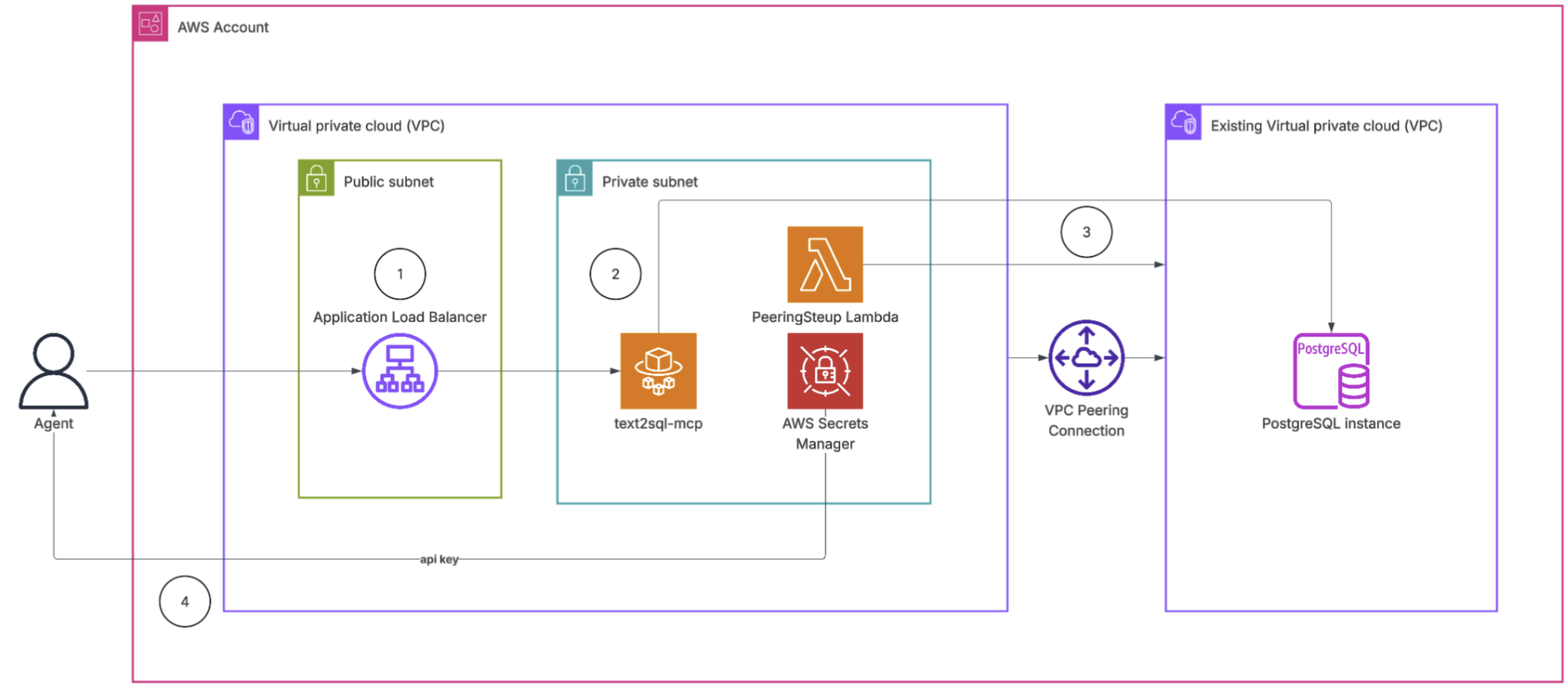
1 — Application Load Balancer (ALB)
The internet-facing entry point that receives requests from the agent and routes them to the MCP server. It handles TLS termination and supports long-lived connections required by the MCP transport protocol.
2 — MCP server (ECS Fargate)
The containerized MCP server that translates natural language into SQL and executes queries against the connected PostgreSQL database. It retrieves credentials securely at startup and runs in an isolated private subnet, accessible only through the load balancer.
3 — VPC peering connection
A private network link between the MCP server's VPC and the VPC hosting the PostgreSQL database. This allows the MCP server to reach the database over an internal network path without routing traffic through the public internet.
4 — API key
A secret token stored in AWS Secrets Manager that the agent must present on every request. This authenticates the caller and prevents unauthorized access to the MCP server endpoint.
2.1 CloudFormation template
Click the link below to open the CloudFormation console with the template pre-loaded:
Launch Stack in AWS Console ->
3. Example: Text-to-SQL with AWS Bedrock AgentCore
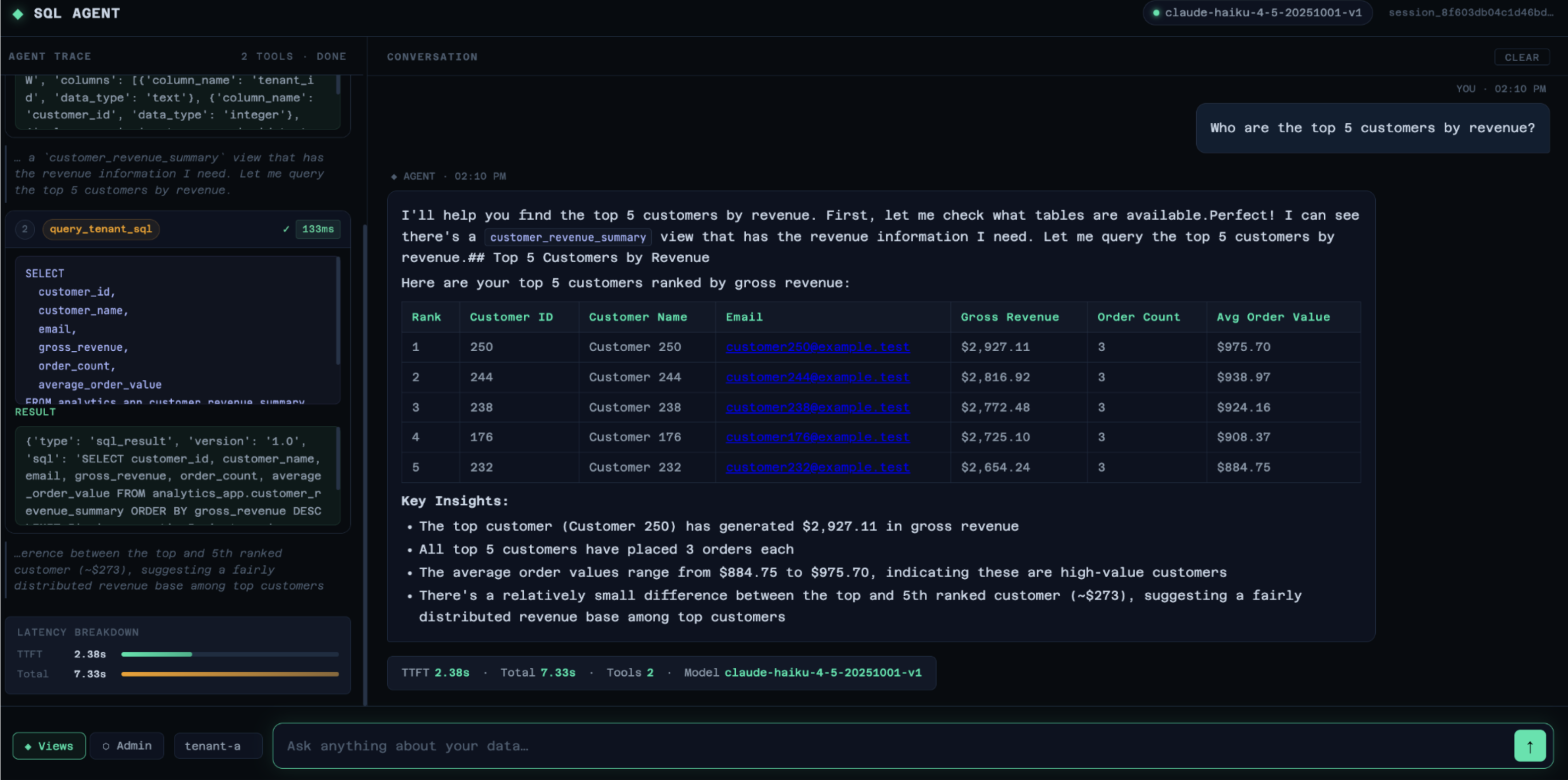
This section walks through a complete working example that demonstrates the Text-to-SQL MCP server in action. The example uses AWS Bedrock AgentCore to invoke a PostgreSQL analytics database through two MCP server deployments, one tenant-scoped and one unrestricted.
3.1 Architecture
The example connects the following components:
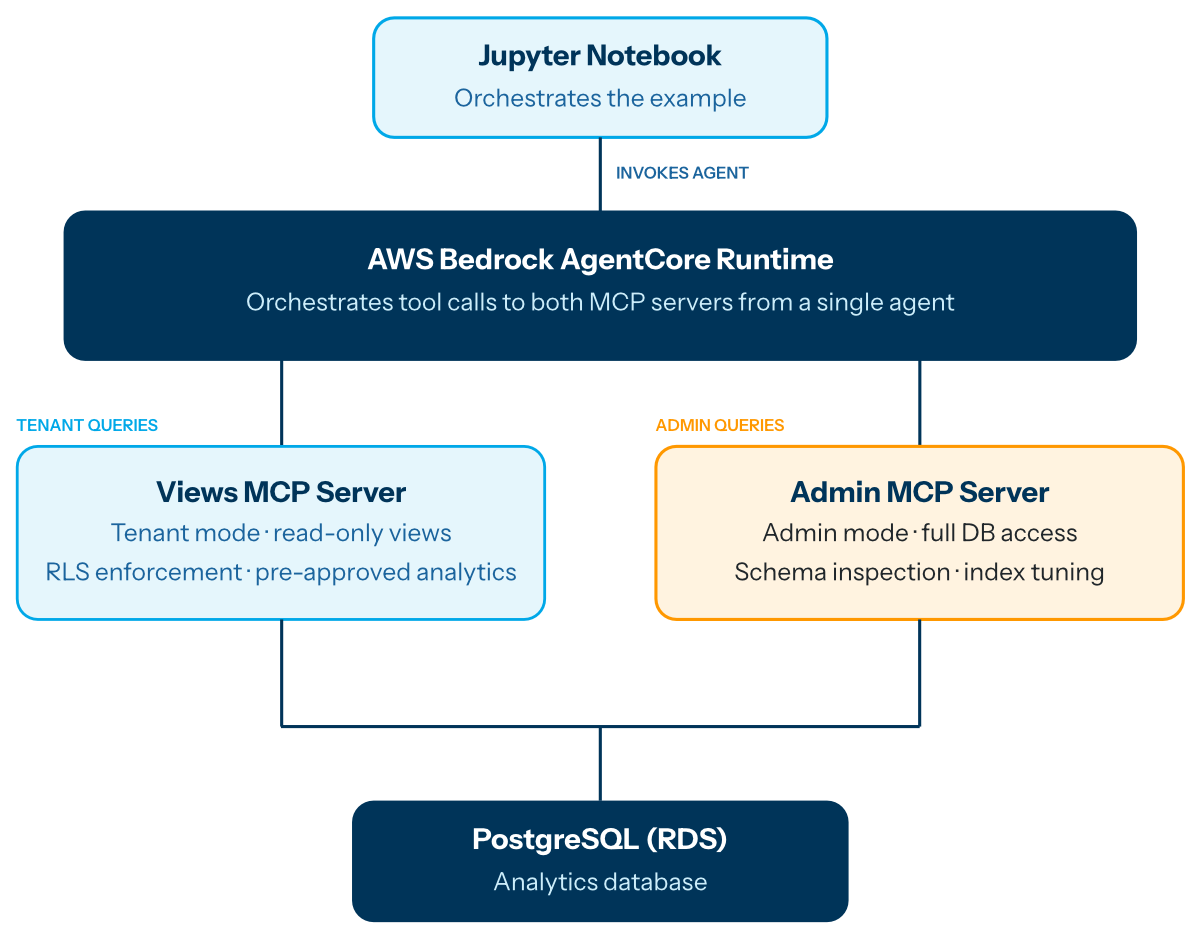
- Views MCP Server — Tenant-scoped, exposes only pre-approved analytics views with RLS enforcement.
- Admin MCP Server — Unrestricted access for schema inspection and index tuning.
- AgentCore Runtime — Orchestrates tool calls to both MCP servers from a single agent.
3.2 Running the example
Access github.com/tech42-org/postgres-mcp-demo to deploy the demo with database, mcp servers, agent and frontend.
4. Frequently Asked Questions
4.1 What's the difference between Admin Mode and Tenant Mode?
4.2 How does the MCP server handle multi-tenant row-level security?
4.3 What PostgreSQL extensions are required?
Two extensions unlock the full performance analysis feature set: pg_stat_statements for workload and slow query analysis, and hypopg for hypothetical index planning. Both are optional (the server runs without them), but index tuning and top-query tools won't function. See Section 1.3 for installation instructions.
4.4 Can I use this MCP server with Amazon RDS or Aurora?
4.5 How is this different from the AWS Labs postgres-mcp-server?